Using Web Workers
Background
This is a Web Worker deep-dive page focused on script eligibility, execution flow, and runtime constraints. If you want the full performance architecture first, read How Lessjs Works.
In a browser process, the execution of JavaScript code is single-threaded, meaning only one piece of code can execute at any given moment. Therefore, it's necessary to classify resources. Immediately necessary resources should be executed without any blocking. In a theme, it needs to load not only its own content (components, JS resources, immediate tracking, etc.) but also plugins installed by the user and third-party scripts (non-immediate necessary resources).
When there are too many non-immediate necessary scripts, both immediate and non-immediate necessary scripts can only queue up to execute in the same single thread. Sometimes, some non-immediate necessary scripts might execute before the immediate necessary scripts, leading to longer loading times for the resources necessary to display the page. This can cause poor page performance and a worsened user experience, with the Total Blocking Time (TBT) metric increasing.
To provide a good user experience, improve the TBT metric, and minimize the main thread workload, we've introduced Web Workers to provide an additional thread to load non-immediate necessary resources.
How it Works
Below is a workflow diagram of loading scripts.
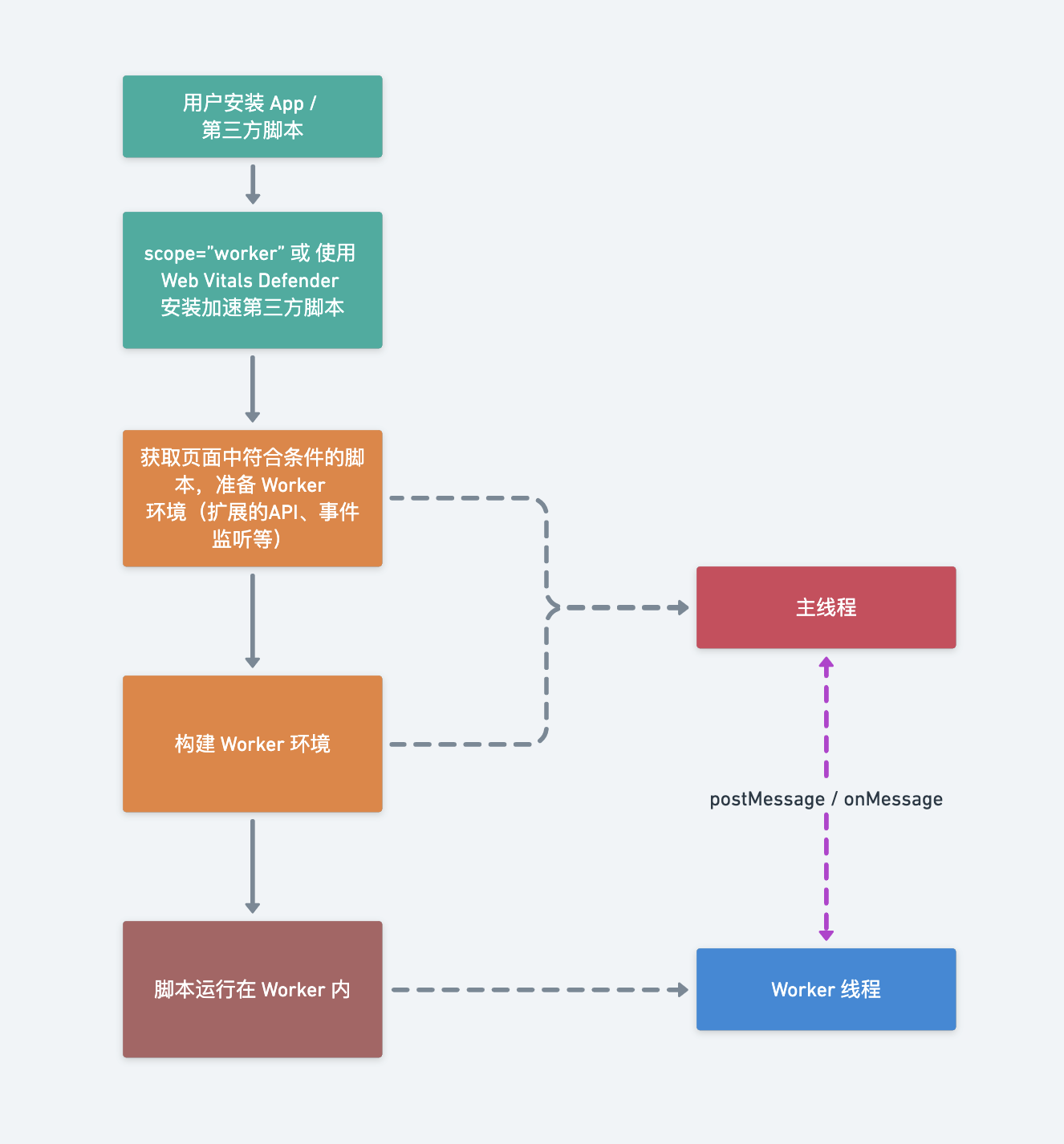
Step-by-Step Explanation
- First, the user has installed an App or has independently introduced third-party scripts to the page.
- Then, the seahorse project will add logic scripts to the page to determine whether a script needs to be executed in a Web Worker.
- In the page, find the scripts that meet the following conditions:
- Script tags with the
scope="worker"attribute - Tags with
srcwhose link matches a script accelerated in the Web Vitals Defender plugin
- Script tags with the
- Prepare the Worker environment for the scripts that meet the conditions and create a new Worker.
- Place the qualifying scripts in the Worker for execution.
Running Scripts in Web Worker
Internal Plugins
Scripts that meet one of the following three forms will be executed in a Web Worker by default.
Third-Party Scripts
Currently, third-party scripts need to be installed in the Web Vitals Defender plugin for acceleration.
FAQ
- In the worker environment, communication with the main thread is done through
postMessage, so JS scripts in this environment can't communicate with the main window. - Some newer APIs, such as insertAdjacentHTML, are not supported in the worker environment. Refer to the Supported DOM APIs documentation.
- Each spz-script acts as an isolated environment, and they cannot communicate with each other.
AI Usage Notes (LLM Ready)
- Section density: detected 4 level-2 headings.
- Example density: detected 1 code blocks.
- Read conclusions first: extract definitions, constraints, and boundary conditions.
- Then verify with examples: rely on executable snippets rather than prose only.
- Finally cross-check: open related component pages to avoid doc/runtime drift.